
Download a comma-separated values (CSV) spreadsheet of your orders to see an overview of your order history and payments collected.
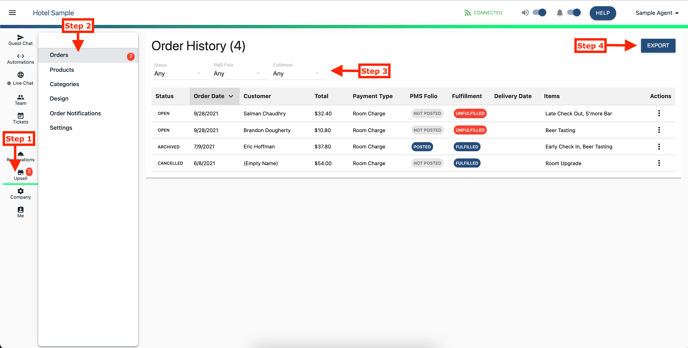
- Go to the Upsell tab inside Whistle
- Select the Orders section
- Filter your orders by Status, PMS Folio, and Fulfillment
- Click Export
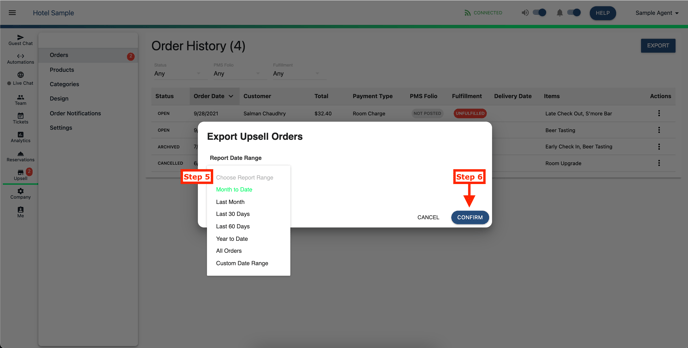
- A second window will appear to select your desired Date Range
- Click Confirm
Additional fields provided in export report;
| Header | Definition |
| ID | Order ID |
| Customer email | |
| PHONE | Customer phone |
| SUBTOTAL | Order's subtotal before taxes and other fees |
| TAXES | Order's taxes, including delivery fee taxes |
| TIPS | Order's tip amount |
| DELIVERY FEE | Order's delivery fee amount |
| PROCESSING FEE | Whistle payment processing fee |
| REFUND AMOUNT | Total amount refunded |
| NET AMOUNT | Order Total - Processing Fee - Refund Amount |
| QUANTITY | Quantity of the line item |
| PRICE | Line item price |
Comments
0 comments
Please sign in to leave a comment.